I’ve suddenly not able to use next gen templates system looks tottaly different to my design!! anyone else with the same issue?
UPDATE/CORRECTION: It turns out the reason my Timer control changed behavior was because I had inadvertently switched to the Classic Builder and the app was designed to run using the Next Gen Builder. Totally my error, but an easy one to make when I’m bouncing back and forth between apps of both flavors. I had submitted a feature request to move the default Builder switch into each individual app file, rather than making it an account-wide selection, to prevent this very type of mistake, but it was my mistake. Sorry.
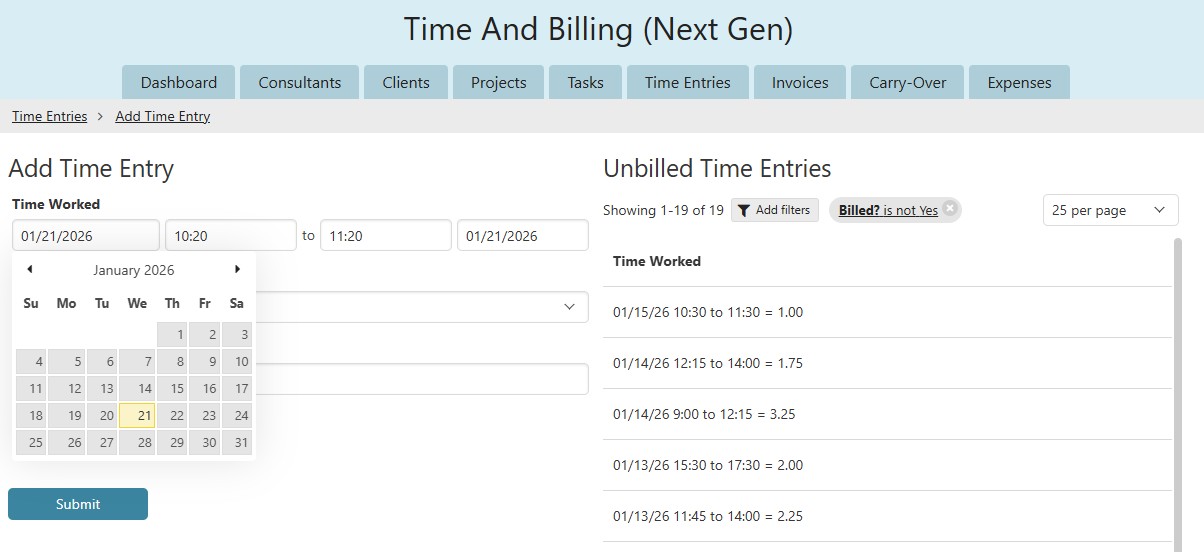
Yesterday I noticed a change in the way the timer field behaves when doing input, and it’s NOT a change for the better! If I stay with Next Gen, I’ll have to reengineer this form.
I’ve not even got the option to move to the new version, just showing classic in the top left of the screen.. I really hope I’ve not lost all my formatting and design. If so, I’m stopping
Same for my project team. Does anyone know how this gets resolved?
This is a huge issue for supporting our clients!
I opened a free account with my personal email to see if it had the same issue and it didn’t. It only has NextGen as an option.
Hi all,
The version issue should now be resolved, and for system issues, keep an eye on status.knack.com. There was an issue with API calls not returning the correct version.
@BajaRic Could you please send me a screenshot of your timer field?
Thank you
Well, it appears that I had inadvertently left my Builder in Classic mode (where most of my work is being done) and THAT’S what caused the sudden change in behavior of the Timer field/control! I apologize for my confusion, but this does reinforce the need for a feature enhancement I submitted a while back: Store the prefered Builder mode in the application file NOT in the account profile.
At any rate, I’m attaching the screenshots that you asked for, even though there’s really no issues on my end.
In Classic live mode (which I am NOT using), the timer control is displayed as 4 linear fields. I use this to enter timesheet data, so multiple, rapid-fire entries twice a month. It’s awkward because both dates have to be manually entered when the desired date isn’t the current date.
In NextGen live mode, the timer control fields are stacked (which I don’t like) but when I select a From date, I can just double-click it and the To date automatically updates to the same date. I still have to enter the correct From and To times, but there’s no way around that. I would LOVE to see the fields displayed horizontally and I’d love it even more if there was a way to force the control to auto-dupe, to speed up adding multiple entries on the same day, but I can live with what I have. I will update my online reply to indicate that this was a pilot error.