Is it possible to validate numeric fields using JavaScript in Next-Gen? In Classic, I used JavaScript all the time to make sure field_1 is less than or equal to field_2, and it worked perfectly. However, I am unable to get it to work on an edit form in Next-Gen. Am I missing something, or do I need to revert to Classic?
Hi @Quynh-Tram - The primary issue is a fundamental shift in how the User Interface (UI) is managed, moving from Imperative (jQuery/Knack Classic) to Declarative (React/Next Gen) programming.
In Classic, jQuery code directly modifies the Actual DOM, but the new Next Gen environment uses a Virtual DOM. React is designed to manage all structural updates efficiently through this Virtual DOM, and when your old jQuery code tries to make direct changes to the Actual DOM.
So, unfortunately the JavaScript code you use in Classic won’t work in Next Gen:
Thank you, @CarlHolmes. The existing JavaScript code I used in Classic won’t work in Next-Gen. Do you know if it possible to validate two numeric fields using JavaScript code in Next-Gen?
Correct - the JavaScript in Classic won’t work in Next Gen.
Unfortunately I’m not coder so I can’t help you adapt the code. 
@CarlHolmes I was able to write a JavaScript code that works! Now, I’m trying to take it one step further to see how I can get the respective fields to highlight/outline in red when the validation is true, so users can see which fields need to be corrected. Thank you for your explanation. It helped me to pivot. This link really helps, too: Getting Started with JavaScript
If anyone knows how to turn fields red like this upon submission using JavaScript code to validate fields, help! TYIA!  Next-Gen

Hi @Quynh-Tram, a lot of us are still wrapping our brains around how to manipulate elements on the page.
One thing I’ve noticed is that Next-Gen has cracked down on changing form input values via JS, so there goes the possibility of updating field values after more complex equations.
If your check is as simple as comparing one number against another, you can get away with this natively:
-
Add a value difference equation field to your table that gets difference between first and second value:
-
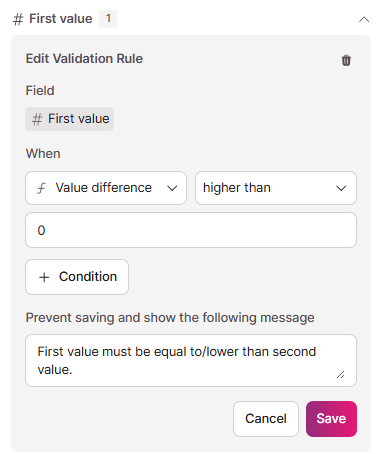
Add a validation rule to your first value field that checks the value difference field:
-
Add this equation field to your form:
You can optionally hide it with CSS using something like:.kn-input.field_xx { display: none; } -
When you submit the form, the native validation should run:

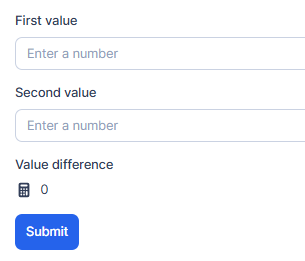

Note that this won’t work if your equation is too complex for Knack to process live in the form, and likely won’t work when doing inline-editing in grid views.
Let me know if that works for you?
@StephenChapman You’re well ahead of me in testing Next-Gen - is there no way of setting a field value in JS? Even by reverting to loading good old JQuery again?
@BradStevens - it appears to work, but doesn’t set it in the background, which you can see in this video.
Similar result with loading in the jQuery library and trying via that method.
Ouch - that’ll hurt if there’s any major apps of ours that ever need moving to Next-Gen. Thanks for the video mate.
Thank you, Stephen. I will give this a try today.
@StephenChapman Unfortunately, it is glitchy. The validation message shows. However, even when I correct the field and the validation is no longer true, it still shows an error message. Perhaps when I click Submit, it does not update the new value difference.
@Quynh-Tram strange, I’m not getting the same issue. What does your validation rule look like? Any chance you could record a short video?
Hi @StephenChapman, I provided some screenshots.
Two numeric fields in the builder:

Value difference field:

Validation:

Modified the field value in the form but validation message still appears:

Wow. Good to know. Now I have to learn a new langague.